
Notion AI and ChatGPT are two highly acknowledged AI tools for one person businesses.
Both use AI to help you work faster. But they’re built for different jobs.
Pick the wrong one and you’ll pay for features you never use. Pick the right one and you’ll get hours back every week.
Here’s what you need to know before you decide.
Table of Contents
Quick Comparison: Notion AI vs ChatGPT
| Feature | Notion AI | ChatGPT (Plus) |
| Best for | Organized solopreneurs inside Notion | Versatile writing, research, and ideation |
| Price | $20/month (Business plan for AI) | $20/month (Plus) |
| Works outside Notion | No | Yes — any browser, app, or workflow |
| Content creation | Good (inside Notion only) | Excellent across all contexts |
| Project management | Built-in (tasks, databases, calendars) | Not built-in — text only |
| Research & web search | Limited | Strong (native web search) |
| Summarizes your docs | Yes — reads your Notion pages | Only if you paste content in |
| Learning curve | Moderate (Notion setup required) | Low — start immediately |
| Custom AI personas | No | Yes (Custom GPTs) |
| Integrations | Google Drive, Slack, Trello | 100+ via plugins and GPTs |
| Image generation | No | Yes (DALL-E) |
| Free plan includes AI | No (trial only) | Yes (limited) |
What Is Notion AI?
Notion AI is not a standalone tool. It lives inside your Notion workspace.
You write a rough outline in Notion. Highlight it and ask AI to polish it. You paste meeting notes into a page and ask for a summary. It works right there, without switching tabs.
That’s the core idea: AI embedded in your workspace, not bolted on as an afterthought.
What Notion AI Does Well
If you already use Notion as your operating system, this tool makes sense. Here’s where it earns its keep:
Summarizing your own notes. This is where Notion AI genuinely shines. You have 3 pages of raw client notes. Ask Notion AI to pull out the key points. Done in seconds.
Polishing drafts inside your docs. Highlight a rough paragraph and click “make this more professional.” It works within your existing context. No copy-pasting into another tool.
Autofilling databases. You can use AI to fill in properties, tags, and descriptions across your Notion databases automatically. This saves real time for anyone managing content pipelines or client trackers.
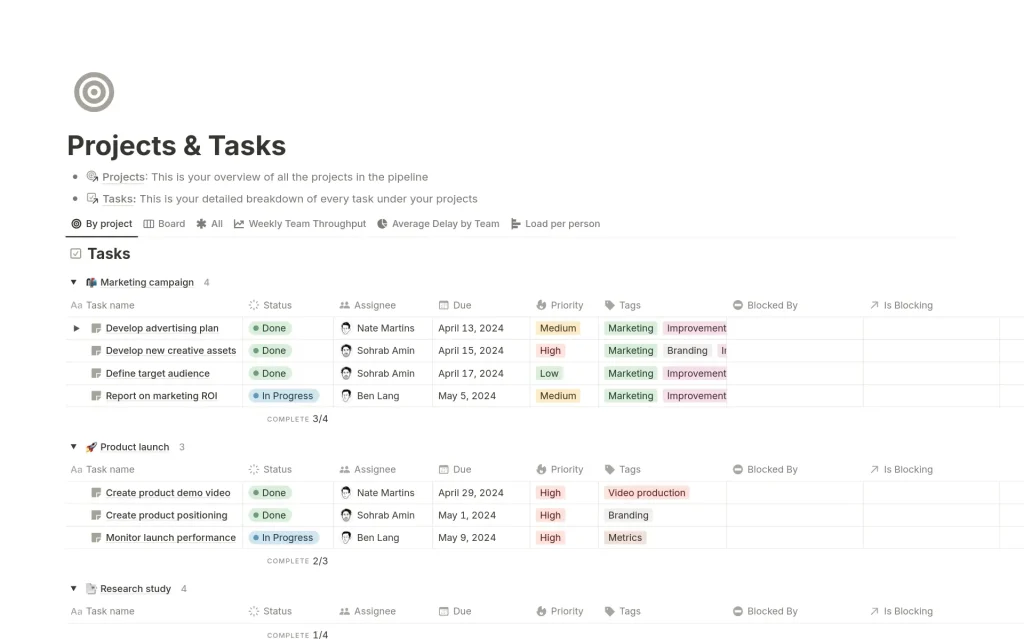
Task and project management. This is where Notion has no competition from ChatGPT. You get tasks, databases, calendars, and kanban boards alongside the AI. Everything in one place.
Where Notion AI Falls Short
It only works inside Notion. If you’re writing an email in Gmail or a caption in a social scheduler, Notion AI is useless.
The pricing changed significantly in 2025. AI features are now bundled into the Business plan at $20/month per user. Previously, you could add AI for $8 to a $10 Plus plan. Now there’s no cheap path to Notion AI for new users.
And if you’re not already a Notion user, the setup time is real. You need to build your workspace before the AI becomes useful.
What Is ChatGPT?
ChatGPT is a conversational AI from OpenAI. You open it, type a prompt, and get a response. No workspace to set up. No ecosystem to learn.
The free tier exists but has usage limits. ChatGPT Plus at $20/month gives you access to the latest models, web search, image generation, and more.
What ChatGPT Does Well
Writing and content creation. This is ChatGPT’s home turf. Blog posts, email sequences, landing page copy, social captions — it handles all of it with context and creativity.
Research. With web search built into Plus, ChatGPT can pull current information and summarize it for you. This is a major edge over Notion AI.
Brainstorming and ideation. You can have a genuine back-and-forth. Pitch five business names. Then narrow it down. Then test each one against your audience. It follows the thread.
Custom GPTs. You can build a custom AI persona trained on your business — your tone, your offers, your FAQ. One-time setup, reusable forever. Notion AI has nothing like this.
Works everywhere. Browser, app, API, integrations. You’re not locked into one ecosystem.
Where ChatGPT Falls Short
There’s no project management layer. ChatGPT generates content and answers questions. But it doesn’t hold your task list, track your projects, or organize your notes.
You also have to bring your own context. If you want it to write based on your old client notes, you need to paste those notes in. Notion AI reads them for you automatically.
And while it integrates with many tools, those connections take time to configure. It’s not plug-and-play like Notion AI is within Notion itself.
Head-to-Head: Key Use Cases for Solopreneurs
Content Creation
ChatGPT wins here. It has more flexibility, stronger output across formats, and doesn’t require you to be inside a specific app.
Notion AI is solid for editing drafts you’ve already started inside Notion. But for generating content from scratch, ChatGPT is faster and more capable.
Managing Tasks and Projects
Notion AI wins, but only because Notion itself wins. You get databases, calendars, and task tracking with AI built in. ChatGPT has no equivalent.
If you want one tool to run your business and write your content, Notion is the closer fit. ChatGPT has no project management features at all.
Research and Learning
ChatGPT wins clearly. The built-in web search keeps it current. You can ask it to summarize a competitor’s website, explain a new marketing concept, or research pricing in your industry.
Notion AI pulls from your existing Notion pages. It has no real web access for research.
Summarizing Notes and Docs
This one is close, but Notion AI has a structural advantage. It can read and summarize your actual Notion pages automatically. With ChatGPT, you paste in the content manually.
If summarizing your own knowledge base is a core need, Notion AI is faster for that specific job.
Writing Emails and Client Communication
ChatGPT wins. It works right inside your browser wherever you need it. Notion AI can help you draft inside Notion, but you’ll still copy-paste it into Gmail anyway.
Pricing Breakdown for Solopreneurs
Both tools cost $20/month at the level where you get meaningful AI features.
ChatGPT Plus at $20/month gives one user access to the latest models, web search, custom GPTs, image generation, and deep research mode.
Notion AI now requires the Business plan at $20/month per user. This includes AI plus the full Notion platform. It’s good value if you need both the workspace and the AI. It’s expensive if you just want AI assistance.
There’s no longer a cheap individual path into Notion AI for new users. The $10 Plus plan exists but AI features are excluded.
For a true solo operator, ChatGPT Plus wins on cost efficiency because you get broader AI capability for the same price. It’s one of the top AI tools on budget for solopreneurs.
Which One Should You Actually Use?
Here’s the honest answer: it depends on how you work.
Use Notion AI if:
- You already live inside Notion daily
- You want your AI embedded in your project management system
- Summarizing your own notes and docs is a frequent need
- You want everything — tasks, writing, and AI — in one place
Use ChatGPT if:
- You want AI you can use everywhere, not just in one tool
- Content creation, research, and brainstorming are your main needs
- You don’t use Notion (or don’t want to start)
- You want custom AI personas built around your business
Even in 2026, ChatGPT is a useful tool for solopreneurs — despite still competition from Gemini, Claude, Deepseek, and Qwen.
Use both if:
- Your budget allows it
- You use Notion for operations and ChatGPT for content and research
- You want the best of a dedicated workspace and a dedicated AI
Many solopreneurs end up here. It’s not a bad setup. But if you’re choosing one, start with ChatGPT. It’s more flexible, works everywhere, and has a lower barrier to getting value on day one.
Key Takeaways
- Notion AI is excellent inside Notion, but only inside Notion. It shines for task management, summarizing your docs, and polishing drafts in your workspace.
- ChatGPT is more flexible and better for content creation, research, and working across your entire tech stack.
- Both cost $20/month at the level where AI features are fully unlocked.
- If you’re starting fresh and want immediate value, ChatGPT Plus is the easier entry point.
- If you’re already a Notion power user, the Business plan’s AI features are a genuine upgrade.
- The best solopreneurs often use both — Notion for operations, ChatGPT for creation.
FAQs
Can I use Notion AI without being a Notion user?
No. Notion AI is built into the Notion platform. You need a Notion account and the Business plan to access it. If you don’t already use Notion, you’d be paying to learn a new workspace just to access its AI features.
Is ChatGPT better than Notion AI for writing?
For most writing tasks, yes. ChatGPT is more capable, more flexible, and works outside any specific app. Notion AI is useful for editing drafts already inside your Notion workspace, but it’s not as strong for generating content from scratch.
Can I use ChatGPT and Notion AI together?
Yes, and many solopreneurs do. A common setup is using Notion for project management and knowledge storage, and ChatGPT for research, content creation, and client communication. They don’t overlap much in practice.
Does Notion AI have a free plan?
The free Notion plan includes a trial of Notion AI features. But for consistent, full AI access, you need the Business plan at $20/month. The old $8/month AI add-on is no longer available for new users as of 2025.