
Dubsado and Honeybook control the freelance CRM space.
Both handle proposals, contracts, invoices, and scheduling inside one dashboard. They promise to automate the administrative work so you can focus on client delivery.
But they approach that promise in completely different ways.
Honeybook leans into simplicity. It is built for service providers who want a clean interface and fast setup.
Dubsado runs deeper. It offers granular control over workflows, complex automation, and detailed pipeline tracking. The trade-off is the learning curve.
Today, I am breaking down Dubsado vs Honeybook for solo business owners. We will cover pricing, feature depth, user experience, and who actually needs which platform.
Dubsado vs Honeybook: Quick Comparison
| Feature | Dubsado | Honeybook |
| Pricing Model | Tiered by active contacts | Flat monthly/annual rate |
| Setup Time | 1 to 2 weeks for full configuration | Under 1 day for basic setup |
| Workflow Automation | Advanced conditional logic and multi-branch triggers | Linear, template-driven sequences |
| Client Portal and UI | Functional, highly customizable | Polished, intuitive, mobile-optimized |
| Proposal and Contract Editor | Detailed, field-heavy formatting | Clean, drag-and-drop simplicity |
| Scheduling | Built-in calendar with buffer rules | Integrated booking with payment collection |
| Learning Curve | Steep, rewards system-builders | Shallow, built for quick adoption |
| Best For | Complex pipelines and detailed automation | Fast setup and clean client experience |
Dubsado vs Honeybook: Core Differences at a Glance
Before diving into individual features, you need to understand the fundamental split between these two platforms.
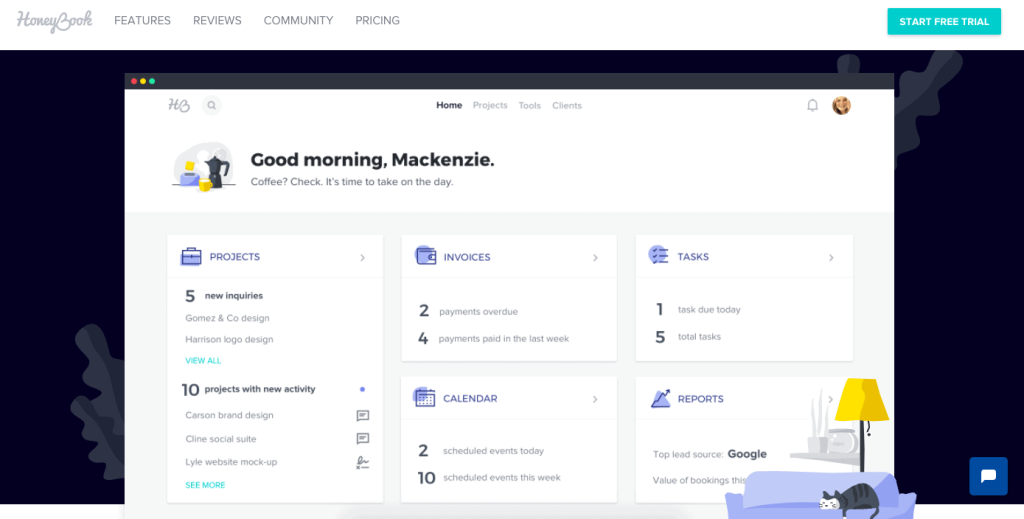
Honeybook keeps the front end clean. It handles proposals, contracts, and scheduling without cluttering your screen.
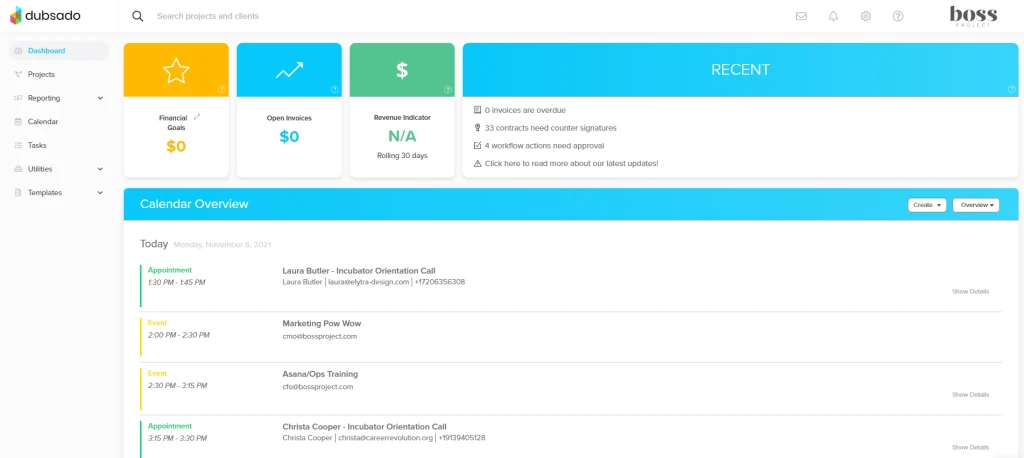
Dubsado functions as a full back-office operations hub. It tracks every stage of your pipeline and lets you build conditional logic that routes clients automatically.
Pricing and Subscription Structure
Honeybook uses a straightforward flat-rate pricing model. You pay a set monthly or annual fee regardless of how many clients or contacts you store.
This makes budgeting predictable for solo businesses scaling up without worrying about per-contact surcharges.
Dubsado ties its pricing to your active contact database. You pay based on the number of people currently in your system. The lower tiers also require an annual commitment to lock in the best rates.
If your business relies on a massive outreach list or keeps every lead indefinitely, the contact limit will force an upgrade.
If you run a lean operation with a tight project pipeline, Dubsado entry plan often costs less than Honeybook.
Setup and Learning Curve
Honeybook gets you live in an afternoon. The templates for proposals, questionnaires, and contracts are polished and ready to use. You customize the branding, connect your calendar, and start sending.
The interface stays organized and avoids feature overload.
Dubsado demands patience. The dashboard loads with triggers, workflow builders, and conditional logic fields.
You will spend the first week mapping out your client journey before you send your first automated sequence.
The trade-off is control. Once you configure Dubsado, it runs exactly how you designed it. The initial time investment pays off once your systems are locked in and running on autopilot.
Workflow Automation and Customization
Automation is where these platforms separate completely. Honeybook handles the standard workflow well.
You set up a sequence that sends a proposal, follows up after three days, collects a contract signature, and triggers a deposit invoice. It covers the typical client journey without friction.
Dubsado treats automation like a programmable pipeline.
You build complex triggers based on form answers, project phases, payment status, and manual tags. You can route clients into entirely different workflows based on a single questionnaire response.
The conditional logic is robust. You can also use internal task assignments, detailed status tracking, and milestone gates.
It is a backend powerhouse for solo operators who run multiple service tiers or complex project lifecycles.
Client Experience and Portal Features
Your clients do not care about your backend. They care about how fast they can book you, sign contracts, and pay invoices. Both platforms deliver here, but the presentation differs.
Honeybook offers a polished, mobile-friendly client portal. The booking widget, proposal signing flow, and payment gateway feel seamless.
Clients get clear status updates and a single link to manage their project. It is designed to feel modern and frictionless.
Dubsado client portal is functional but leans utilitarian. It handles the same tasks efficiently. The proposal and contract signing process works smoothly.
The difference shows up in how you organize the front end. Dubsado gives you more room to customize the email sequences and forms that lead into the portal. Honeybook optimizes the client-facing side out of the box.
Who Should Choose Dubsado?
Dubsado fits solo business owners who treat their operation like a scaled agency. You need it if your service delivery requires multiple decision points, detailed intake forms, and automated routing based on client responses.
It works best when you sell tiered packages, run ongoing retainers, or manage projects with strict milestone tracking.
The platform thrives on structure. You build the machine once, and it handles the follow-ups, contract routing, and payment reminders without you touching it.
You should also pick Dubsado if you plan to hire a virtual assistant later. The permission settings, internal task assignments, and detailed pipeline views make delegation straightforward.
The contact-based pricing also rewards lean operations. If you keep your CRM clean and only track serious leads, you stay on the lower tier without paying for dead weight.
Who Should Choose Honeybook?
Honeybook belongs to solo creators, consultants, and service providers who want to spend less time building systems and more time working with clients.
The platform removes friction. You log in, select a template, customize the branding, and start sending.
It is the better choice if your client journey follows a straight path. Book a call, sign the contract, pay the deposit, deliver the service. You do not need complex branching logic or deep pipeline analytics.
You just want a reliable tool that looks professional and handles the paperwork automatically.
The flat pricing model also helps when your lead volume fluctuates. You never hit a contact limit or get penalized for keeping old inquiries in your database.
If you value speed, clean design, and a straightforward monthly bill, Honeybook covers the essentials without the steep learning curve.
The Bottom Line
Dubsado vs Honeybook for solo business comes down to workflow complexity versus simplicity. Honeybook wins on speed, design, and ease of use.
It gets you operational fast and keeps the client experience polished. Dubsado wins on control, automation depth, and system scalability. It requires upfront work but rewards you with a highly customized backend.
Neither platform will fail you. Both handle the core requirements of a modern solo business.
Pick Honeybook if you want a clean, reliable system that runs itself with minimal configuration.
Pick Dubsado if you need a detailed operational hub that adapts to complex project structures and automated client routing.
Set up your pipeline once. Test it with real leads. Stick with the platform that matches how you actually work, not how you hope you will work in six months.
You can also check our take on the best CRM tools for solopreneurs that are free!
FAQs
Can I switch from Honeybook to Dubsado or vice versa?
You can migrate your data, but it requires manual work. Both platforms allow CSV exports for contacts, invoices, and project details. Automations and workflows will not transfer directly. You will need to rebuild your sequences and templates in the new system. Plan the switch during a slow period to avoid disrupting active client projects.
Do Dubsado and Honeybook integrate with accounting software?
Yes. Both platforms connect with QuickBooks Online and Xero. They also sync with Stripe and PayPal for payment processing. Dubsado offers Zapier and Make integrations for custom connections. Honeybook provides a similar native integration suite with a focus on keeping workflows inside the dashboard.
Which platform is better for creative freelancers like photographers or designers?
Honeybook generally fits creative freelancers better out of the box. The proposal templates, gallery links, and client portal are designed for visual service providers. Dubsado can handle creative work just as well, but you will spend more time configuring the forms and automation to match a typical creative workflow.
Do I need a separate scheduling tool with either platform?
You do not. Both Dubsado and Honeybook include built-in calendar systems. You can set buffer times, limit availability, and require payment collection before confirming bookings. The native scheduling tools sync with Google Calendar and Outlook. You only need an external scheduling app if you require highly specialized availability rules not covered by the native system.