
If you’re running a one-person business, you don’t need a 30-feature accounting platform built for a team of 20. You need something that tracks your money, helps you invoice clients, and doesn’t make tax season a nightmare.
That’s what both Wave and QuickBooks Solopreneur promise to do.
But they go about it differently, they cost differently, and they’re built for slightly different versions of “solopreneur.” So before you just pick the one you’ve heard of more, here’s what you actually need to know.
Wave Accounting vs QuickBooks Solopreneur : Quick Comparison
Let’s take a quick look at how Wave Accounting and QuickBooks Solopreneur stands next to each other.
Invoicing
| Feature | Wave | QuickBooks Solopreneur | Edge |
| Unlimited invoices (free tier) | Yes | 2/month on free tier | Wave |
| Invoice customization | Logo, colors, templates | Logo, basic customization | Tie |
| Convert estimates to invoices | Yes | Yes | Tie |
| Recurring invoices | Pro plan only | Included on paid plan | QuickBooks |
| Late payment reminders | Pro plan only | Yes | QuickBooks |
Expense and Income Tracking
| Feature | Wave | QuickBooks Solopreneur | Edge |
| Automatic bank imports | Pro plan only | Paid plan | Tie |
| Business vs personal split | Manual separation | Built-in, clean split | QuickBooks |
| Receipt scanning | Pro plan only | Paid plan (mobile app) | Tie |
| Mileage tracking | Not available | GPS auto-tracking | QuickBooks |
Accounting and Reporting
| Feature | Wave | QuickBooks Solopreneur | Edge |
| Double-entry accounting | Full (all plans) | Simplified tracking only | Wave |
| Balance sheet | Yes (all plans) | Not available | Wave |
| Profit & loss report | Yes | Yes | Tie |
| Custom chart of accounts | Yes | Predefined categories only | Wave |
Taxes
| Feature | Wave | QuickBooks Solopreneur | Edge |
| Quarterly tax estimates | Not built in | Automated estimates | QuickBooks |
| TurboTax integration | No native integration | Direct export | QuickBooks |
| CPA-ready financials | Yes (double-entry) | Limited (no balance sheet) | Wave |
Payroll and Payments
| Feature | Wave | QuickBooks Solopreneur | Edge |
| Payroll | Add-on ($25–$40/mo + $6/employee) | Not included | Wave |
| Online payment acceptance | Via Wave Payments (fees apply) | Via QuickBooks Payments | Tie |
Integration and Support
| Feature | Wave | QuickBooks Solopreneur | Edge |
| Native third-party integrations | Wave products only; Zapier for others | Broader ecosystem | QuickBooks |
| Mobile app | Yes | Yes | Tie |
| Customer support | Email/chat (Pro); limited on Starter | Phone + chat (Lite plan) | QuickBooks |
| Scalability | Ceiling for growing businesses | Solo only; upgrade to QBO needed | Tie |
Wave Accounting
Wave is a cloud-based accounting platform built for freelancers, solo operators, and micro-businesses. It’s been around since 2010, was acquired by H&R Block in 2019, and now serves over 2 million small businesses globally.
The big selling point? The core software is free.
Wave is one of the best invoicing app for beginner solopreneurs.
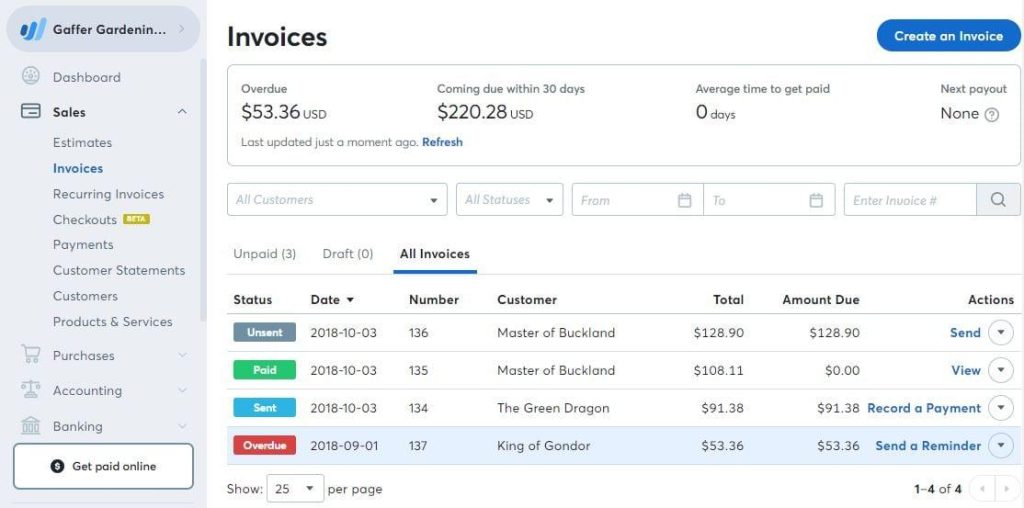
You get unlimited invoicing, expense tracking, and double-entry accounting on the Starter plan at $0/month. No trial. No credit card. It’s just free.
Wave added a paid Pro tier ($16/month billed monthly, or $170/year) that unlocks automatic bank transaction imports, receipt scanning, and priority support. Payment processing and payroll cost extra on top of any plan.
What Wave Is Good At
- Sending professional invoices to clients
- Basic bookkeeping and expense tracking
- Double-entry accounting (which means your records hold up if a CPA or lender ever looks at them)
- Keeping your costs at zero when you’re just starting out
Where Wave Falls Short
- No mileage tracking at any tier
- Limited integrations (Wave only connects natively to Wave Payments and Wave Payroll — everything else needs Zapier, and that costs extra)
- Automatic bank imports require the Pro plan; on Starter, you import CSV files manually
- No project tracking or inventory management
QuickBooks Solopreneur
QuickBooks Solopreneur is Intuit’s stripped-down product for one-person businesses. It replaced QuickBooks Self-Employed and is priced at $20/month (or $0/month for a free tier with very limited features).
It’s not the full QuickBooks Online. There’s no customizable chart of accounts, no balance sheet, and no multi-user access. It’s built to answer one specific question: “Am I making money, and am I ready for taxes?”

What QuickBooks Solopreneur Is Good At
- Automatic GPS mileage tracking from your phone
- Separating business vs. personal transactions cleanly
- Estimating quarterly taxes so you’re not blindsided in April
- Direct TurboTax integration when it’s time to file
- Receipt scanning via mobile app
Where QuickBooks Solopreneur Falls Short
- No balance sheet reporting (that’s a real limitation if you ever apply for a loan or work with a CPA)
- Predefined expense categories only — you can’t customize the chart of accounts
- $20/month for features Wave gives you free
- Reviewers have reported bugs with bank feeds and mileage syncing
- Not built to scale — once your business grows, you’ll outgrow it fast
Wave Accounting vs QuickBooks Solopreneur: Feature-by-Feature
Here’s how they stack up on the features solo operators care about most.
Invoicing
Both platforms let you create and send professional invoices.
Wave’s free Starter plan includes unlimited invoicing. QuickBooks Solopreneur’s paid $20/month plan also includes unlimited invoicing — the free tier caps you at two invoices per month.
Edge: Wave. You get the same invoicing capability for $0 that QuickBooks charges $20/month for.
Expense Tracking
Both platforms connect to your bank and categorize transactions.
The catch with Wave is that automatic bank imports require the Pro plan ($16/month). On Starter, you download a CSV from your bank and upload it manually.
QuickBooks Solopreneur handles bank connections on its paid plan and lets you split transactions between business and personal — which is genuinely useful if you’re not using a dedicated business account.
Edge: Tie. QuickBooks is slightly more polished here, but Wave’s Pro plan covers the gap at a lower price.
Mileage Tracking
This is where QuickBooks wins outright. It uses your phone’s GPS to automatically log business trips, categorize them, and calculate your deductible mileage.
For anyone who drives regularly for work — visiting clients, making deliveries, running to suppliers — this is a real tax saver.
Wave has no mileage tracking at any price point.
Edge: QuickBooks Solopreneur.
Tax Preparation
QuickBooks Solopreneur is built around taxes.
It estimates your quarterly tax payments, tracks deductible expenses by category, and exports directly to TurboTax. If you file your own taxes and already use TurboTax, this workflow is genuinely convenient.
Wave handles bookkeeping well, but it doesn’t estimate your quarterly taxes or have a native tax filing integration.
Edge: QuickBooks Solopreneur.
Accounting Depth
This one might surprise you. Wave’s free Starter plan uses proper double-entry accounting and can generate a balance sheet.
QuickBooks Solopreneur does not produce a balance sheet — it’s simplified income/expense tracking.
If you ever apply for a business loan, bring in a bookkeeper, or need your financials reviewed by a CPA, Wave’s accounting structure will hold up better.
Edge: Wave.
Pricing
| Plan | Wave Starter | Wave Pro | QuickBooks Solopreneur Free | QuickBooks Solopreneur Paid |
| Monthly Cost | $0 | $16/month | $0 | $20/month |
| Invoicing | Unlimited | Unlimited | 2/month | Unlimited |
| Bank Imports | Manual (CSV) | Automatic | None | Automatic |
| Mileage Tracking | No | No | 5 trips/month | Unlimited |
| Receipt Scanning | No | Yes | 2/month | Unlimited |
| Balance Sheet | Yes | Yes | No | No |
Who Should Pick Wave
Go with Wave if:
- You want solid accounting and invoicing at zero cost
- You work with a bookkeeper or accountant (they’ll appreciate the double-entry structure)
- You don’t drive for work regularly
- You’re in the early stages of business and want to keep overhead low
- You might need a balance sheet someday for a loan or investor
The free tier is genuinely useful, not a bait-and-switch. You can run a real freelance business on Wave Starter and never pay a dollar.
Who Should Pick QuickBooks Solopreneur
Go with QuickBooks Solopreneur if:
- You drive frequently for work and want automatic mileage logging
- You file your taxes through TurboTax and want a clean export
- You want estimated quarterly tax reminders built into your software
- You prefer a simpler interface over more accounting depth
If the TurboTax integration and GPS mileage tracking are going to save you hours every year, $20/month is easy to justify.
The Bottom Line
Wave and QuickBooks Solopreneur solve slightly different problems.
Wave is the better accounting platform. It’s free, it handles real bookkeeping, and it doesn’t limit your invoicing or expense tracking to artificially justify a monthly fee.
QuickBooks Solopreneur is the better tax tool. If your main pain point is quarterly taxes, mileage deductions, and a clean TurboTax handoff at year end, it earns its $20/month.
For most people just starting out — or anyone who doesn’t drive for work — Wave is the smarter starting point. You can always switch later when your needs grow. And when they do grow significantly, you’ll likely outgrow both of these tools anyway and move up to QuickBooks Online or a similar full-featured platform.
Start with what solves your actual problem today.
If you liked this content, check out our take on the best CRM apps for solopreneurs.
FAQs
Is Wave really free, or is there a catch?
The core software — invoicing, expense tracking, and double-entry accounting — is genuinely free on the Starter plan with no time limit. You pay only for add-ons like the Pro plan ($16/month), payroll, or payment processing fees. If you don’t accept online payments through Wave and don’t need automatic bank imports, $0/month is your real cost.
Can QuickBooks Solopreneur handle my quarterly taxes?
Yes — it’s one of its strongest features. QuickBooks Solopreneur tracks your income and deductible expenses throughout the year, estimates what you owe each quarter, and integrates directly with TurboTax when it’s time to file. For self-employed people who file their own taxes, this can save hours of work.
Which tool is better if I work with a bookkeeper or CPA?
Wave. It uses proper double-entry accounting and produces a balance sheet — both things CPAs and bookkeepers expect to work with. QuickBooks Solopreneur uses simplified tracking and doesn’t generate a balance sheet, which limits what a professional can do with your records during tax prep or a financial review.
What happens when my business outgrows both tools?
Both Wave and QuickBooks Solopreneur are designed for solo operators and have real ceilings — no inventory, no project tracking, limited users. When you grow, QuickBooks Online (starting at $38/month) is the most common next step, as it shares the same ecosystem as Solopreneur and migration is straightforward. Wave users typically move to QuickBooks Online or Xero.