
Most solopreneurs use whatever calendar came with their email.
That’s usually Google Calendar or Apple Calendar. It works.
But it doesn’t do much beyond showing you what’s next.
It doesn’t block your focus time. It doesn’t schedule your actual work. And it doesn’t protect your most productive hours from back-to-back meetings.
When you work alone, your calendar is your operating system. Get it right and your week runs clean. Get it wrong and you spend every day reacting instead of building.
Here are the best calendar apps for solopreneurs in 2026 — from free starting points to AI-powered tools that schedule your day automatically.
Table of Contents
Best Calendar Apps for Solopreneurs: Quick Look
| App | Best For | Free Plan | Paid Plan Starts | AI Scheduling | Platforms |
| Google Calendar | Simplicity and universal integration | Yes | Free | No | All platforms |
| Notion Calendar | Notion users wanting calendar + workspace sync | Yes | Free (Notion plan for advanced features) | No | Mac, iOS, Android, Web |
| Fantastical | Apple users who want speed and polish | Yes (limited) | ~$5/month (annual) | No | Apple + Windows |
| Reclaim AI | Automatic task scheduling around meetings | Yes | $8/user/month | Yes | Web (Google + Outlook) |
| Motion | Fully automated AI scheduling for busy operators | No (trial only) | $29/month (individual) | Yes | Web, iOS, Android |
What Makes a Calendar App Worth Using for Solopreneurs
A calendar app for solopreneurs needs to do more than show meetings.
You need it to help you protect time for actual work. As a solopreneur, no one is blocking your focus hours.
If you don’t do it, it won’t happen. Meetings will fill every gap and you’ll wonder where your week went.
The right calendar tool helps you see your full week clearly, schedule deep work alongside client commitments, and stop the constant back-and-forth over finding a meeting time.
Here’s what each top option actually delivers.
The Best Calendar Apps for Solopreneurs
Google Calendar
Google Calendar is the starting point for most solopreneurs, and there’s a real reason for that.
It’s free, and works on every device.
Google Calender syncs instantly with Gmail. And it integrates with nearly every tool you’ll ever use — Zoom, Calendly, Toggl, Slack, Notion, ClickUp, and hundreds more.

The interface is clean. Event creation is fast. Sharing availability with clients takes seconds. For a solopreneur just building their system, it covers the basics without any setup friction.
The limitation is what it doesn’t do.
Google Calendar shows you what’s scheduled.
It doesn’t help you decide what to work on or when. It won’t block your focus time automatically.
You’re entirely responsible for structuring your own week.
What works well:
- Completely free with no meaningful limitations
- Universal integrations across every major tool
- Works perfectly across web, iOS, Android, and desktop
- Easy calendar sharing and client-facing availability links via third-party tools
What it lacks:
- No AI or automatic task scheduling
- No built-in time blocking prompts
- You build your whole structure manually
Best for: Solopreneurs who are just getting started, want a free foundation, or use a separate scheduling tool like Calendly on top.
Notion Calendar
Notion Calendar, formerly known as Cron, is one of the most thoughtfully designed calendar apps available.
The interface is fast and clean. Keyboard shortcuts make common actions instant. Time zone management is excellent.
And if you already run your business in Notion, the integration is genuinely useful — you can link calendar events directly to Notion pages, projects, and databases.
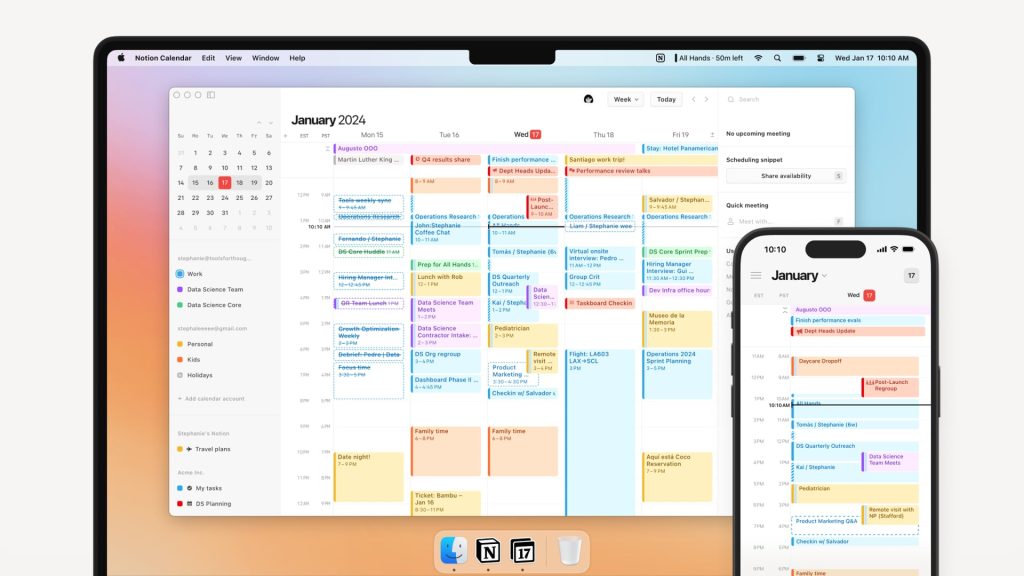
That connection matters for solopreneurs managing multiple clients in Notion.
When a client meeting appears on your calendar, you can open it and immediately see the relevant project notes, deliverables, and context.
No switching tabs to find the background.
The app is free. For most features, you don’t need a paid Notion plan.
There are real limits though.
Notion Calendar only works with Google Calendar. No Outlook support. And like Google Calendar, it shows you what’s scheduled. It doesn’t schedule your work for you.
What works well:
- Free to use with no time limit
- Clean, fast interface with strong keyboard shortcut support
- Links calendar events to Notion pages and databases
- Excellent time zone display for solopreneurs with international clients
What it lacks:
- Google Calendar only — no Outlook or iCloud sync
- No task scheduling or AI features
- Full value requires already using Notion
Best for: Solopreneurs who run their business inside Notion and want their calendar tightly connected to their workspace.
Fantastical
Fantastical has been one of the best-designed calendar apps for years. Its core strength is speed.
You type “call with client Thursday at 2pm for 45 minutes” and Fantastical creates the event instantly.
Natural language input is genuinely fast. It also handles complex recurring events, weather in the calendar view, and multiple time zones without confusion.
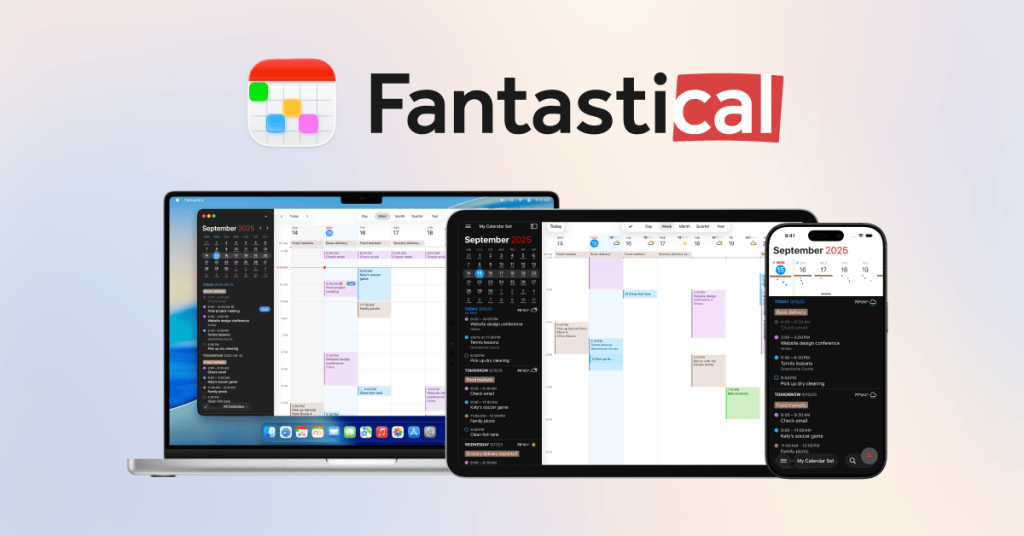
Calendar sets are a practical feature for solopreneurs.
You create groups of calendars and toggle between them. Work calendars during the day. Personal calendars in the evening.
One app handles everything without manually turning individual calendars on and off.
The basic version is free with decent functionality.
Full features including natural language, weather, and advanced recurring events require Flexibits Premium at around $5/month billed annually.
Fantastical runs on Apple platforms natively.
There’s a Windows version, but it’s not as polished. If you’re Android-based, skip this one entirely.
What works well:
- Natural language event creation that actually works
- Beautiful, fast interface on Apple devices
- Calendar sets for easy work/personal switching
- Weather in calendar view for planning-aware scheduling
What it lacks:
- Apple-first. Windows version is functional but limited. No Android.
- No automatic task scheduling
- Premium required for most useful features
Best for: Solopreneurs on Apple devices who want the fastest, most polished calendar experience with natural language input.
Reclaim AI
Reclaim AI works differently from every other tool on this list.
It sits on top of your existing Google or Outlook calendar.
You connect your task tools — Todoist, Asana, ClickUp, Jira — and Reclaim automatically finds open slots and schedules your tasks around your meetings. When something moves, it adjusts.
You can also set habits — lunch break, gym, focus time — and Reclaim protects those slots and moves them when conflicts arise.
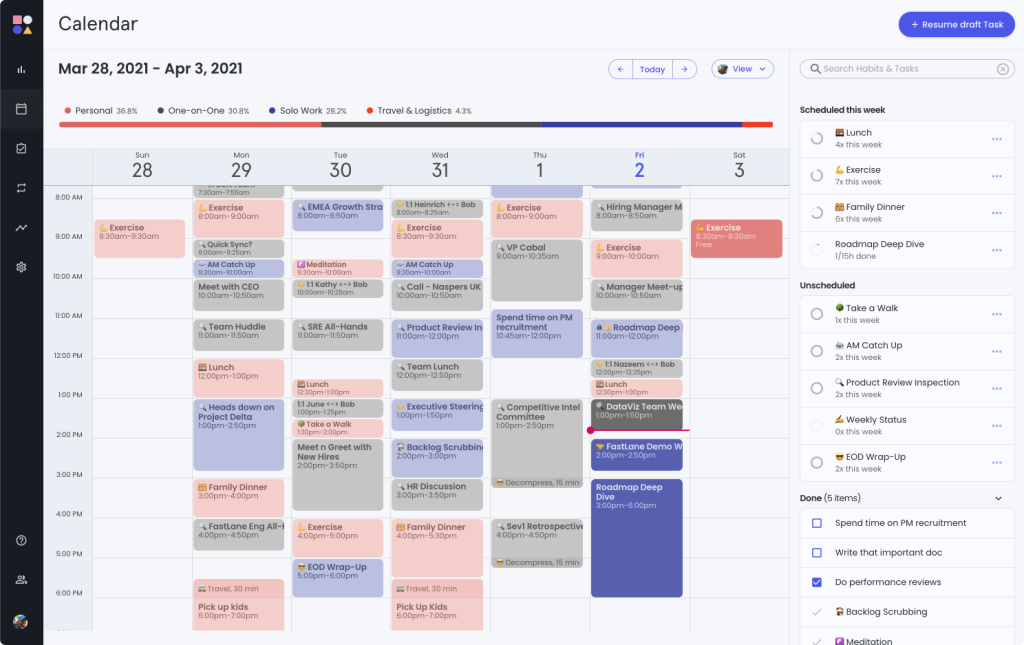
Instead of manually blocking time every Sunday, the tool builds your week around your commitments automatically.
For a solopreneur managing deep work alongside client calls and administrative tasks, this is the most practical upgrade from a plain calendar. Reclaim handles the logistics.
The free plan is solid. It includes basic smart scheduling and habit protection.
Paid plans start at $8/user/month and unlock more task sources, deeper integrations, and more complex scheduling rules.
What works well:
- Automatically schedules tasks around meetings
- Habit blocking that adjusts dynamically when your schedule shifts
- Integrates with Google Calendar, Outlook, Todoist, Asana, ClickUp, Jira
- Free tier is genuinely functional for basic scheduling
- Protects focus time without constant manual effort
What it lacks:
- Web only — no dedicated desktop or mobile apps
- Works best with Google or Outlook. No standalone calendar features.
- Less useful if your tasks aren’t in a supported app
Best for: Solopreneurs who have real work to schedule — not just meetings — and want AI to handle time blocking automatically.
Motion
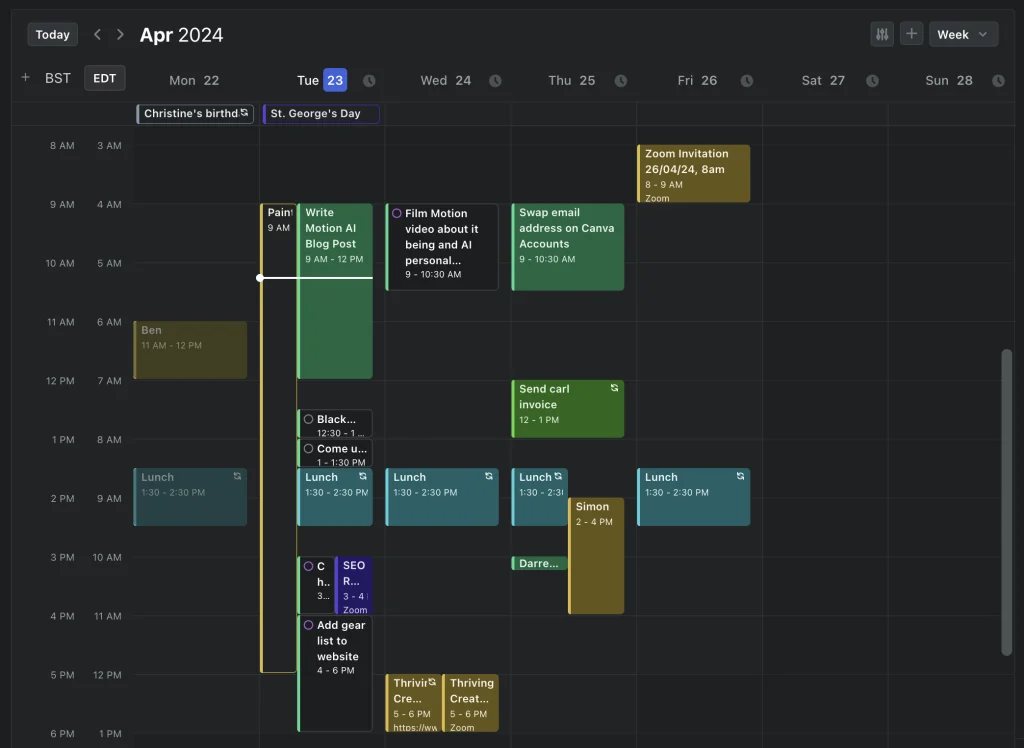
Motion is the most aggressive AI scheduler on this list.
You add tasks with deadlines and priorities. Motion builds your entire day automatically.
When a meeting gets added or a task changes, it rebuilds the schedule. It’s closer to an AI assistant than a calendar app.
The appeal for solopreneurs is real. You stop deciding when to work on what. Motion handles that. Your calendar becomes a living plan, not a static grid of meetings.
The tradeoff is control. Motion makes scheduling decisions for you. Some find that freeing. Others find it disorienting when the AI reshuffles a carefully planned afternoon.
The other tradeoff is cost.
At $29/month for an individual, it’s the most expensive option on this list by a significant margin.
There’s no free plan. You get a short trial, then you’re committing to a subscription at a price point that adds up over a year.
What works well:
- Fully automated AI scheduling that adapts in real time
- Handles tasks and meetings together in one view
- Removes the daily decision of “what should I work on now”
- Strong for solopreneurs with dense, deadline-driven workloads
What it lacks:
- Expensive at $29/month with no free tier
- Less user control than every other tool here
- Steeper learning curve to configure correctly upfront
Best for: Solopreneurs with heavy workloads, multiple deadlines, and a willingness to let AI manage their schedule entirely.
How to Choose the Right One
Start with your current setup and what’s actually broken.
You want a reliable free base: Google Calendar. Use Calendly for booking links on top of it. Simple setup, no cost, works everywhere.
You live in Notion: Notion Calendar is the natural fit. It’s free and connects your calendar to your workspace.
You’re on Apple and want speed: Fantastical at $5/month is worth it. Natural language input and calendar sets are genuinely faster.
You want your work scheduled automatically: Reclaim AI at $8/month is the most accessible entry into AI scheduling. Start on the free plan.
You want AI to run your whole day: Motion at $29/month is the most powerful option. Only commit if your workload is dense enough to justify it.
If you want to maximize your productivity, check out our coverage on the best time tracking apps for solopreneurs!
Key Takeaways
- Google Calendar is the best free starting point. It does the basics well and integrates with everything. The gap is structure — you’re building it yourself.
- Notion Calendar is free and ideal for Notion users. The calendar-to-workspace connection reduces context switching across client projects.
- Fantastical is the best pick for Apple users who want a polished, fast experience. Worth the $5/month for the natural language input alone.
- Reclaim AI fills the biggest gap most solopreneurs face: scheduling actual work, not just meetings. Its free tier is a good entry point.
- Motion is the full AI scheduling experience but at $29/month with no free plan. Best suited for solopreneurs with high-volume, deadline-driven work.
- The most common mistake: treating your calendar as a meeting list instead of a weekly plan. Whichever tool you choose, protect time for deep work. Treat it like a real meeting.
FAQs
Is Google Calendar good enough for solopreneurs?
Yes, for basic scheduling. Google Calendar is free, works on every platform, and integrates with nearly every tool solopreneurs use. The limitation is that it only shows what’s scheduled. It won’t block focus time automatically or help you prioritize tasks. Most solopreneurs benefit from pairing it with a scheduling tool like Calendly or an AI layer like Reclaim AI.
What calendar app is best if I already use Notion?
Notion Calendar (formerly Cron) is the natural choice. It’s free and links calendar events directly to your Notion pages, projects, and databases. That means when a client meeting opens on your calendar, you immediately see the project context without switching tabs. The one limit: it only syncs with Google Calendar, not Outlook.
What’s the difference between a calendar app and an AI scheduling tool?
A standard calendar app like Google Calendar or Fantastical shows what’s on your schedule. An AI scheduling tool like Reclaim or Motion actively builds your schedule. It takes your tasks, your meetings, and your habits and decides when each thing happens — then adjusts when something changes. For solopreneurs juggling deep work and client commitments, AI scheduling removes the daily planning burden.
Is Motion worth $29/month for a solopreneur?
It depends on your workload. If you’re managing multiple clients with hard deadlines and your calendar fills up fast, Motion’s automated scheduling can save meaningful time and mental energy. If your schedule is lighter or more flexible, Reclaim AI at $8/month (or free) gives you AI scheduling without the premium price tag.